
Have you ever had tasks on your to-do list that you know should be automated but keep putting off anyway? That’s been me with various GitHub repos I maintain. Some of them don’t require frequent updates, but others like the new GitHub Copilot CLI for Beginners repo need frequent updates to stay current. Copilot CLI evolves fast, so the course content can get stale quickly. I also wanted to pull GitHub traffic stats (views and unique visitors) into the repo automatically instead of checking them manually or writing a separate program to grab them. Both of those tasks need a bit of logic and judgment, so a plain cron job wouldn’t cut it. But they’re also tedious enough that I’d look at them, sigh, and move on to something else.
GitHub Agentic Workflows solved both problems for me. Getting there was a great learning experience in how the security model works, how to structure instructions for the agent, and how to debug when things go wrong. Here’s a rundown of what I learned along the way.
What Is an Agentic Workflow?
The short answer is you write a markdown file. The top half is YAML frontmatter (schedule, tools, permissions) while the bottom half is plain English instructions telling the agent what to do. You compile it with gh aw compile, which generates a GitHub Actions workflow YAML file - that’s what actually runs.
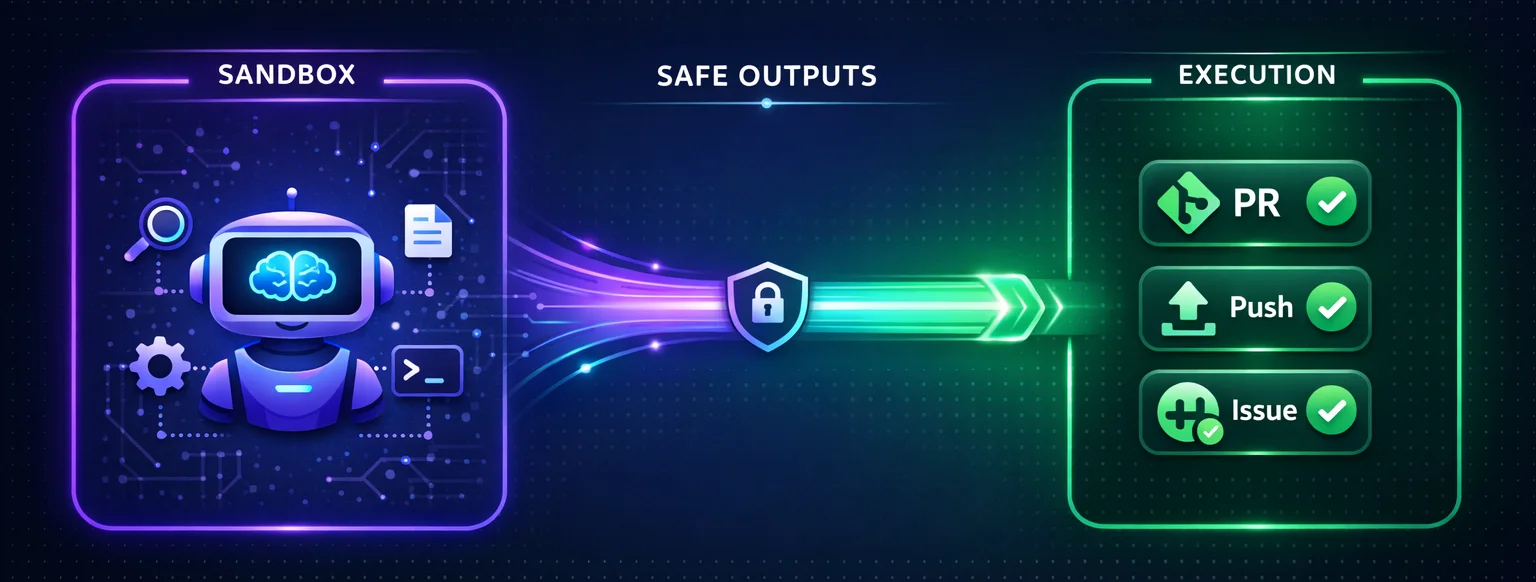
The agent itself runs in an isolated sandbox. It can read your repo, call tools, and when granted edit permissions, modify files in the checkout. But it still can’t push code, create issues directly, or access protected secrets. When it wants to do something privileged, it requests it through “safe outputs,” which is a separate job with its own permissions that validates the request before executing it. The agent proposes. A different process disposes. That separation is the whole security model.
The Course Updater Workflow
My first workflow (course-updater.md) checks the Copilot CLI changelog daily, compares what’s new against the course content, and opens a PR if anything needs updating. Here’s the frontmatter:
on:
  schedule: daily
  workflow_dispatch:
tools:
  bash: ["curl", "gh"]
  edit:
  web-fetch:
  github:
    toolsets: [repos]
safe-outputs:
  allowed-domains:
    - github.com
  create-pull-request:
    labels: [automated-update, copilot-cli-updates]
    title-prefix: "[bot] "
    base-branch: main
The markdown body below the frontmatter reads like a task you’d write for someone on your team:
- Fetch recent updates from the changelog
- Compare against existing course content
- If updates are needed, edit the chapters
- Open a PR with a summary of changes
The agent gets web-fetch, bash, edit, and GitHub tools. It figures out what’s relevant for beginners (since that’s the audience), makes the edits, and opens the PR. Took about 20 minutes to set up and it’s been running without issues.
The Traffic Updater Workflow
The second workflow (traffic-updater.md) fetches weekly repo traffic stats from the GitHub API and appends them to CSV files. Views in one file, unique visitors in another. Should be simple. It was not simple simply because there were different levels of permissions I needed to have in place.
The GitHub Traffic API needs a token with elevated permissions, specifically a fine-grained PAT with Administration read access. My first attempt was passing the token as an environment variable. The compiler said no. Secrets in env: get “leaked” to the sandbox, which violates the security model.
I tried sandbox.agent.env to inject it directly into the agent’s environment. The compiler accepted that, but then quietly added my token variable to the --exclude-env flags on the sandbox startup command. Turns out every secret-bearing env var gets stripped out automatically. The sandbox really does not want your tokens.
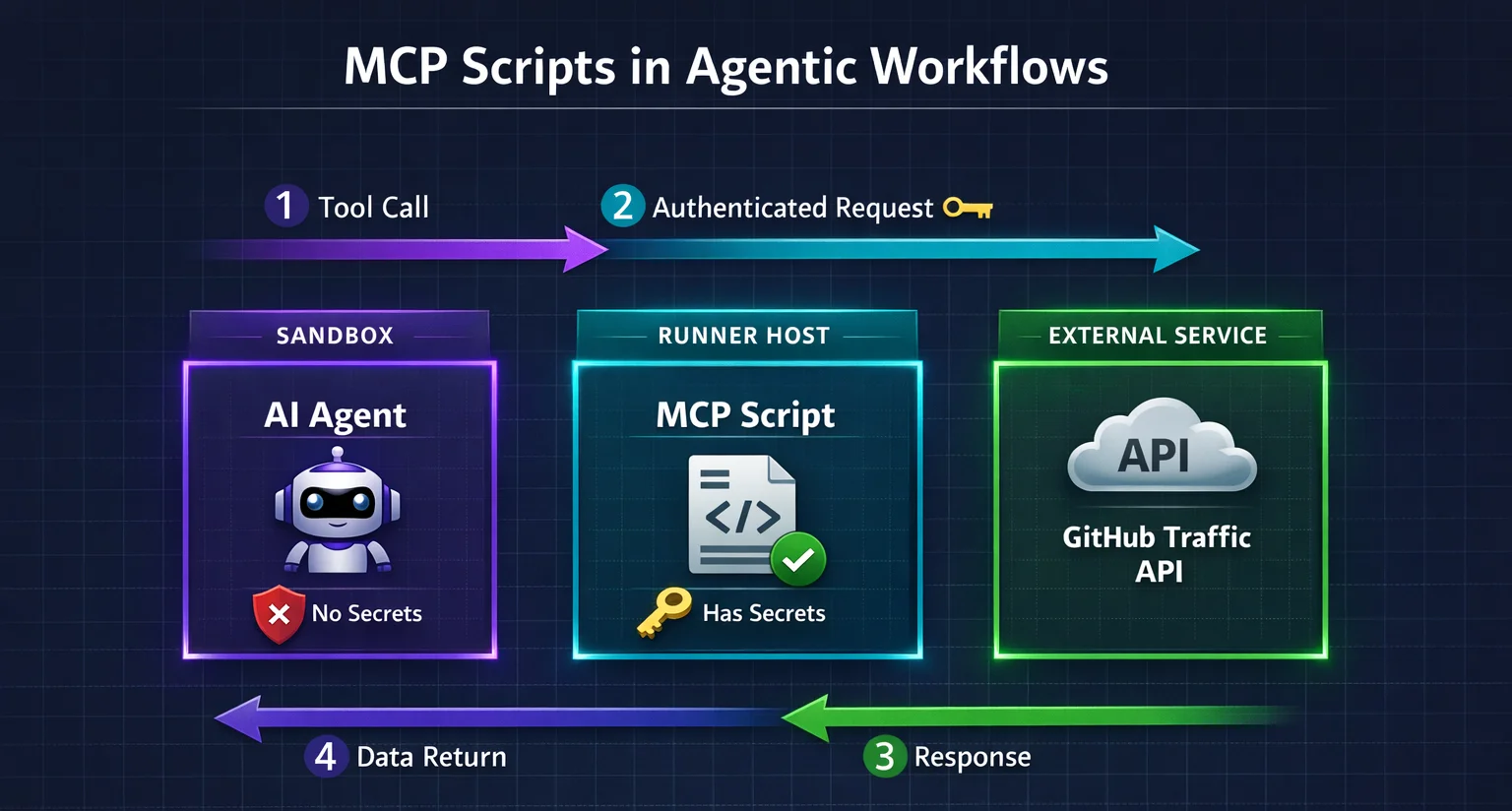
After a few more failed attempts, I found an approach that worked: MCP scripts. These are tool definitions in your frontmatter that run outside the sandbox, on the runner host itself. The agent calls them like any other tool, but the actual script has access to secrets the sandbox never sees:
mcp-scripts:
  fetch-traffic:
    description: "Fetch traffic views from the GitHub API"
    run: |
      gh api repos/$GITHUB_REPOSITORY/traffic/views
    env:
      GH_TOKEN: "${{ secrets.GH_AW_GITHUB_TOKEN }}"
The agent calls fetch-traffic, gets JSON back, and never touches the token. Once I found that pattern, the rest fell into place pretty quickly.
What Else Went Wrong
The CSV files live under .github/, which is a protected path prefix. I added them to allowed-files in the config and assumed that would be enough. It wasn’t. The allowed-files and protected-files checks run independently, and both have to pass. I also needed protected-files: allowed. Figuring that out cost me several workflow runs and a lot of staring at error logs and asking Copilot CLI what was wrong.
Token permissions were another slow discovery. The fine-grained PAT needed Administration (read) for the traffic API, Contents (read and write) for pushing branches, and Pull Requests (read and write) for creating PRs. Each missing permission showed up as a different error in a different workflow step, so it felt like whack-a-mole for a while.
By default, agentic workflows also create GitHub issues when there’s nothing to do (a “no-op” run) and when something fails. For a weekly data-collection workflow, that meant a lot of noise in my issues tab. I ended up setting noop: report-as-issue: false and fallback-as-issue: false to turn that off.
Here’s the final safe-outputs config for the traffic updater after working through all of those issues:
safe-outputs:
  allowed-domains:
    - github.com
  noop:
    report-as-issue: false
  create-pull-request:
    labels: [automated-update, traffic-data]
    title-prefix: "[bot] "
    base-branch: main
    fallback-as-issue: false
    protected-files: allowed
    allowed-files:
      - ".github/uvs.csv"
      - ".github/views.csv"
    github-token: ${{ secrets.GH_AW_GITHUB_TOKEN }}
One thing that did save me time: the compiler. Every frontmatter change requires a recompile with gh aw compile (markdown body edits take effect immediately). It catches bad frontmatter, unsupported options, and potential secret leaks before you push anything. If it comes back with zero warnings, you’re probably okay.
Would I Do It Again?
Absolutely! I already have, technically, since I built two of them. The course updater has flagged doc gaps I would have missed. The traffic updater just started running, but automatically creates a PR when there’s new stats to capture. That’s the goal, really.
The setup wasn’t quick but that’s because this was my first time going through the process and learning what you can and can’t do. The security model is strict (which is a good thing) and the error messages don’t always point you at what’s actually wrong. But the strictness is the point. The sandbox isolation, the protected file checks, the token exclusions are all there so you can let an agent touch your repo without losing sleep.
If you have repo tasks that need some logic and judgment but aren’t worth your time every week, give it a shot. Once you get the hang of the patterns and permissions, it’s a powerful way to automate without giving up control. I’ll be creating additional agentic workflows in other repos to help automate processes I don’t want to have to manually do myself.